Last Update: 16/01/2026
Dashboard Overview
The Dashboard is your central hub for managing the ARS Shopify Plugin. From here, you can monitor your integration status, access quick links to key features, and navigate to specific configuration settings.
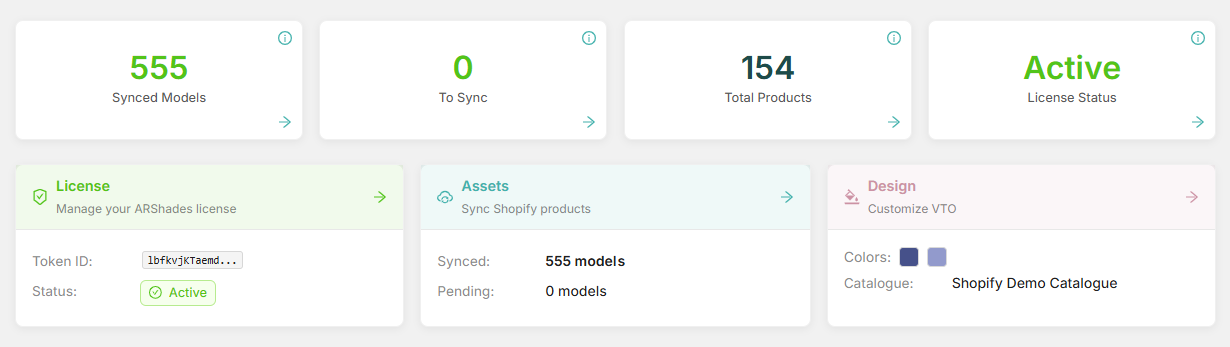
Interface Overview
The Dashboard is designed to provide a clear snapshot of your current setup.
Key Areas
- Status Indicators: Check at a glance if your license is active and if your product catalog is synced.
- Quick Actions: Cards or buttons that take you directly to common tasks such as:
- Sync Catalog: Update your product list from ARS.
- Customize Experience: Adjust the Virtual Try-On (VTO) settings.
- Manage License: View your licence details and enabled services, or update the connection.
Navigation Menu
The sidebar menu allows you to navigate between the different modules of the plugin.

Menu Items
- ARShades/Dashboard: Return to the main overview page.
- License: Manage the License TOKEN and review licence details and enabled services (see VTO & 3D Viewer License).
- Assets: View your synced products and their 3D/AR status (see Feature Navigation).
- Customization: Configure the look and feel and behaviour of the VTO experience.
Getting Started
If you are logging in for the first time, your primary goal is to ensure your License is connected. Once connected, the Dashboard will unlock the other features.
Proceed to the next section to set up your license.