Last Update: 16/01/2026
Embed Components
For advanced integrations or themes that do not support App Blocks in certain areas, ARShades provides App Embeds. These are scripts that run globally on your store to enable floating widgets or specific behaviours.
Enabling Embeds
- In the Shopify Theme Editor, go to the App Embeds tab (icon on the far left sidebar).
- Locate ARShades Core or ARShades Overlay.
- Toggle the switch to On.
- Save.
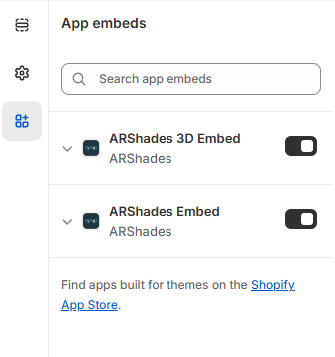
Configuring Embeds
Once enabled, you can click on the small arrow next to the embed name to expand its settings. This allows you to configure global behaviours such as auto-launch on specific pages or floating button styles.
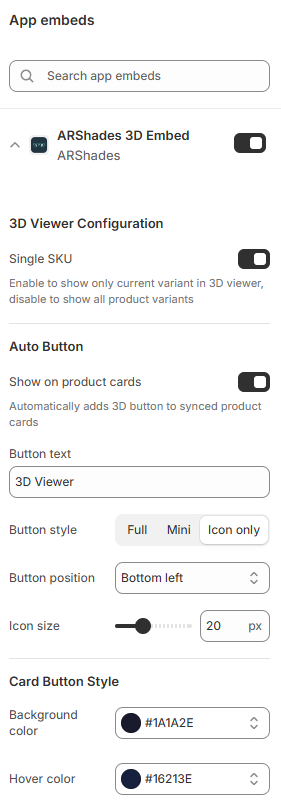
Use Cases
- Floating Action Button (FAB): A "Try On" button that stays visible as the user scrolls the page.
- Global Scripts: Ensures that the VTO logic is loaded on all pages, which is required if you are using custom code or placing buttons on collection pages.
- ARPDMeter Support: The ARShades VTO Embed must be enabled for the PD Meter block to work. See ARPDMeter Component for details.
- Add to Cart inside the VTO: the settings that let shoppers add the frame they are trying on straight to the cart live on the ARShades VTO Embed. See Add to Cart.
Tip: For most modern themes, we recommend using App Blocks (previous section) for better placement control. Use Embeds only if you need a floating widget or specific global functionality.